
Why CPU Transcoding Beats GPU for Live Streaming
CPU-based video transcoding remains the most cost-effective and flexible solution for self-hosted live streaming — especially when using high-core processors such as AMD EPYC and Intel Xeon.
Real-World CPU Transcoding Power
A modern 64-core AMD EPYC 7002 series CPU (128 threads) can reliably transcode up to ~120 concurrent HD (1080p) live streams using efficient x264 presets. This makes EPYC-based servers one of the best price-per-stream solutions available for professional streaming platforms and transcoding farms.
CPU vs GPU Transcoding – What’s the Difference?
Live streaming platforms typically choose between CPU software encoding and GPU hardware acceleration. While GPUs can be fast, CPUs offer a superior balance of quality, flexibility, and cost — especially at scale.
Advantages of CPU Transcoding
- Higher visual quality at the same bitrate using software x264 encoding
- Fine-grained control over FFmpeg presets, bitrates, profiles, and keyframes
- No GPU driver dependencies or hardware encoder limits
- Runs on affordable, widely available server hardware
- Predictable scaling as CPU cores increase
GPU Transcoding Limitations
- Expensive GPU servers with limited availability
- Hardware encoder stream limits on many GPUs
- Lower quality per bitrate compared to tuned CPU encoding
- Less flexibility for advanced FFmpeg tuning
How Many Streams Can a CPU Handle?
The number of streams a CPU can transcode depends on resolution, bitrate, and encoding presets. However, the following real-world estimates are typical for H.264 live streaming workloads.
| CPU | Cores / Threads | Estimated HD Streams |
|---|---|---|
| Ryzen 5 / Core i5 | 6–10 / 12–16 | 4–6 |
| Ryzen 9 / Xeon Silver | 12–16 / 24–32 | 8–14 |
| Dual Xeon E5-2697A v4 | 32 / 64 | 30–60 |
| AMD EPYC 7002 | 64 / 128 | 60–120+ |
CPU vs GPU Transcoding – Cost Per Stream
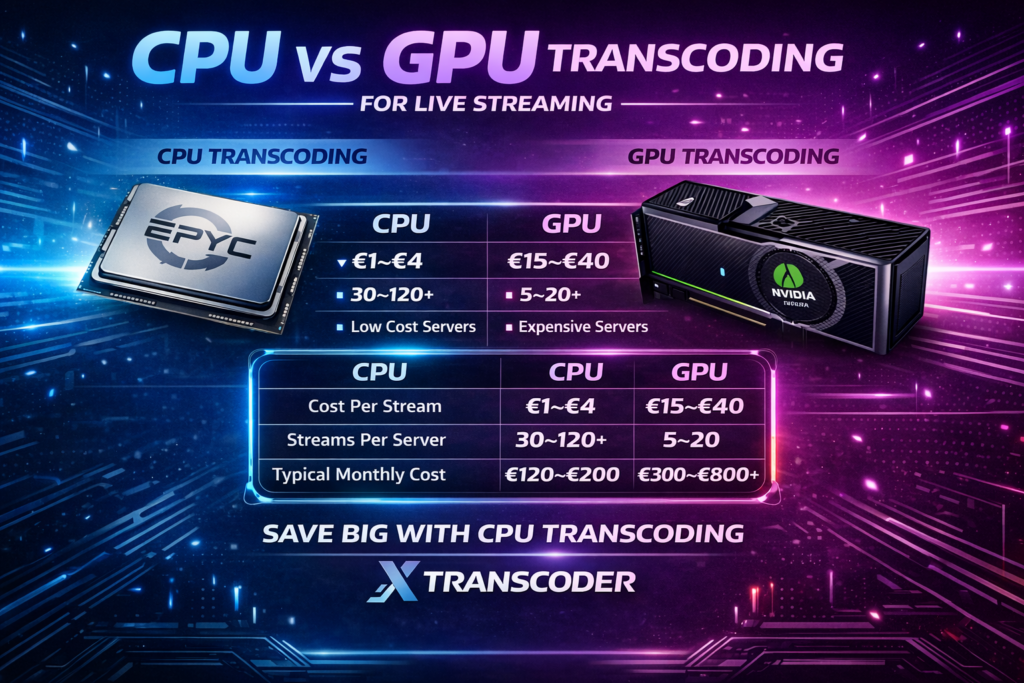
One of the biggest differences between CPU and GPU transcoding is cost per concurrent stream. The table below compares realistic real-world deployments.
| Metric | CPU Transcoding | GPU Transcoding |
|---|---|---|
| Server Cost | Low (CPU-only servers) | High (GPU premium) |
| Typical Monthly Cost | €120–€200 | €300–€800+ |
| Streams per Server | 30–120+ | 5–20 |
| Cost per Stream | €1–€4 | €15–€40 |
| Quality per Bitrate | Higher | Lower |
| Scalability | Linear | Capped |
Estimates based on 1080p H.264 live streaming workloads using common FFmpeg presets.
Estimates assume 1080p H.264 transcoding with balanced presets.
Cheap CPU Servers for Transcoding
Because CPU-only servers are far cheaper than GPU instances, you can dramatically reduce streaming infrastructure costs.
One excellent source for high-core servers is:
Example high-value server:
- Superstar Suite
- 2× Intel Xeon E5-2697A v4 (32 cores / 64 threads)
- 64 GB ECC RAM
- 2× 960 GB SSD
- 10 Gbit uplink + Anti-DDoS
- €180 / month
With a 10 Gbit port, network bandwidth is not a bottleneck — allowing the CPU to operate at full capacity for large-scale live streaming.
Why Xtranscoder Is Optimised for CPU Transcoding
Xtranscoder is designed around CPU-based FFmpeg workflows, allowing you to extract maximum value from modern multi-core processors.
- Efficient default presets for quality vs performance
- On-demand streaming to save CPU when streams aren’t viewed
- Advanced FFmpeg tuning without command-line complexity
- Scales linearly with additional CPU cores
For most professional streaming use-cases, CPU transcoding delivers the lowest cost per stream, the highest compatibility, and the most predictable scaling.
Get Started with Xtranscoder
Xtranscoder is purpose-built for high-density CPU-based live streaming. Deploy on your own server in minutes and scale with confidence.